I came across a user requirement to ensure that the short URL for a portal was resolved to a fully qualified domain URL. For example when users access http://portal they are automatically redirected to the fully qualified URL http://portal.contoso.com .
By default, what happens is when you enter a short URL, say http://portal/IT the browser shows the short URL rather than a fully qualified URL http://portal.contoso.com/IT
You really want the best of both worlds!! Allowing the user to type in whatever they want but resolving this automatically in the background. I find that the users want to simply type in the short URL as it is easier and quicker.
In my case, the business had a specific requirement to ensure consistency when sending links to documents, manage corporate branding and compatibility for bespoke application built on SharePoint.
Steps to take to implement this solution;
| 1 | First, create a new website on the Web Server within IIS |
| |  |
| | Add the Host Name i.e. the short URL part. See example image above. |
| 2 | Next, Select the HTTP Redirect option for the newly created website. |
| | 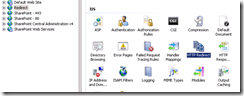 |
| 3 | Select the option to Redirect and enter the fully qualified URL here. See example figure below. |
| |  |
That’s it. you may need to restart this new website.
Now test the navigation thoroughly.


